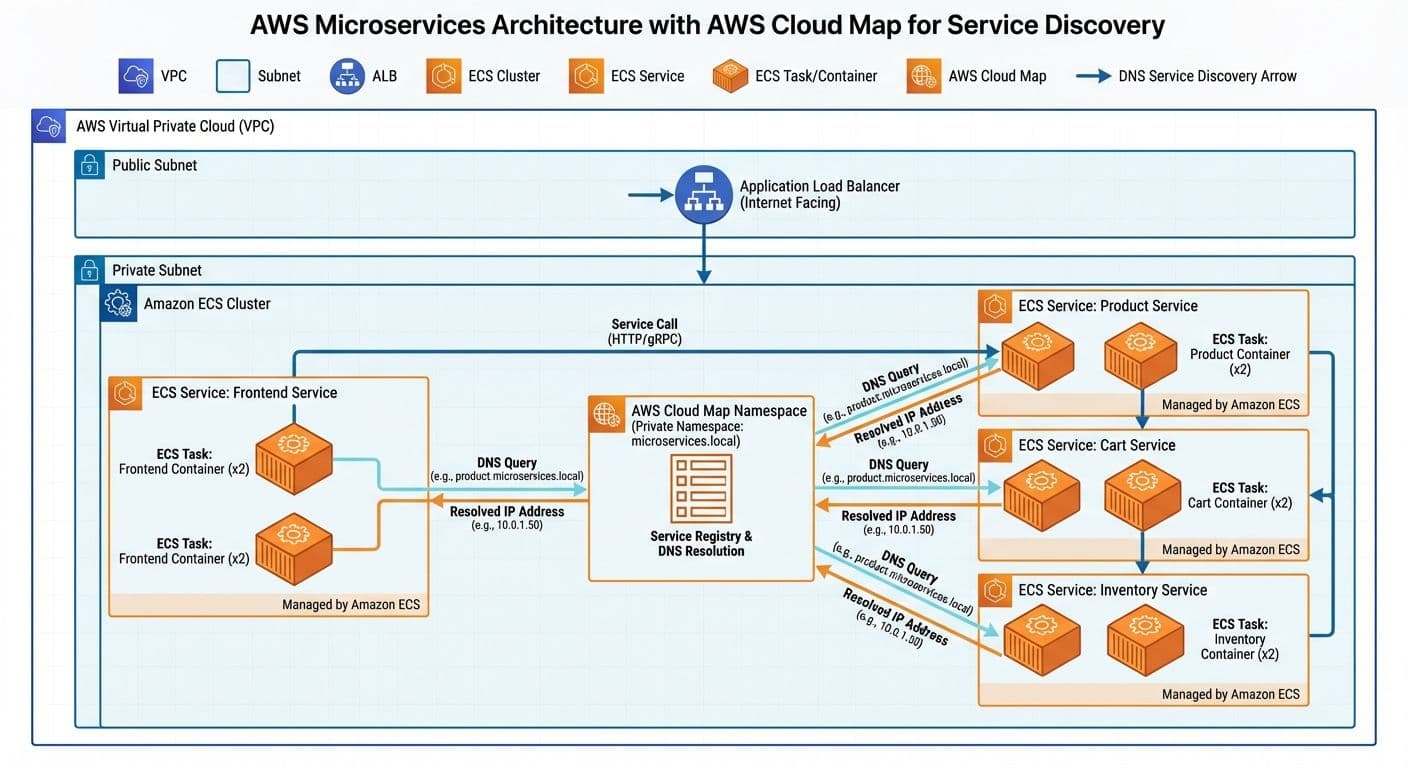
How we used AWS Cloud Map to solve service discovery, health-aware routing, and configuration drift in a 7-microservice transport management system running on ECS.
SP
Saurabh Parmar
Author
Updated 3 min read
How we used AWS Cloud Map to solve service discovery, health-aware routing, and configuration drift in a 7-microservice transport management system running on ECS.
Managing service-to-service communication in a microservices architecture is challenging. After building a transport management system with 7 microservices, here's how AWS Cloud Map solved our service discovery problems.
In a microservices architecture, services need to find and communicate with each other. Traditional approaches like hardcoded endpoints or load balancer DNS don't scale well:
AWS Cloud Map provides DNS-based and API-based service discovery with health checking built in. Key benefits for our ECS workloads:
Our transport management system consists of 7 services that need to communicate:
Each service registers with Cloud Map using a private DNS namespace (e.g., tms.local), allowing services to reach each other via DNS names like order-service.tms.local.
Enabling Cloud Map for an ECS service requires adding a service registry configuration. In Terraform:
The key settings are the service_registries block that links ECS to Cloud Map, and setting dns_records with type A for direct IP resolution or SRV for port information.
Cloud Map supports three health check types:
For our ECS services, we use container health checks with the HEALTHCHECK_CUSTOM_CONFIG routing policy, ensuring Cloud Map only returns healthy instances.
With Cloud Map configured, services communicate using simple DNS names. The Order Service calling the Routing Service:
Example endpoint: http://routing-service.tms.local:8080/api/optimize
DNS resolution happens automatically within the VPC, returning only healthy instance IPs. No service mesh or sidecar required for basic service discovery.
After migrating to Cloud Map, we observed:
AWS Cloud Map is an excellent choice for ECS-based microservices that need service discovery without the complexity of a full service mesh. Start with DNS-based discovery and only add complexity (like App Mesh) when you need advanced traffic management features like circuit breaking or mutual TLS.
Production-tested AWS WAF best practices for securing fintech applications, including recommended architecture, managed rule groups, CloudFormation configuration, monitoring, and common pitfalls to avoid.
Read articleHow we implemented centralized logging for four ECS Fargate microservices using Grafana Loki and Fluent Bit sidecars, cutting debugging time by 90% and reducing logging costs by 60%.
Read articleLearn how to orchestrate a multi-service blockchain validator stack using Docker Compose, including Sisu, Dheart, Deyes, Ganache, and MySQL, with health checks, logging, and multi-validator setups.
Read article