Production-tested AWS WAF best practices for securing fintech applications, including recommended architecture, managed rule groups, CloudFormation configuration, monitoring, and common pitfalls to avoid.
SP
Saurabh Parmar
Author
Updated 3 min read
Production-tested AWS WAF best practices for securing fintech applications, including recommended architecture, managed rule groups, CloudFormation configuration, monitoring, and common pitfalls to avoid.
Securing fintech applications requires defense-in-depth strategies. After implementing AWS WAF for multiple financial services clients, here's what actually works in production.
Fintech applications handle sensitive financial data and are prime targets for attacks. A single breach can mean regulatory penalties, lost customer trust, and significant financial damage. AWS WAF provides a critical security layer between your application and the internet.
Key threats WAF protects against:
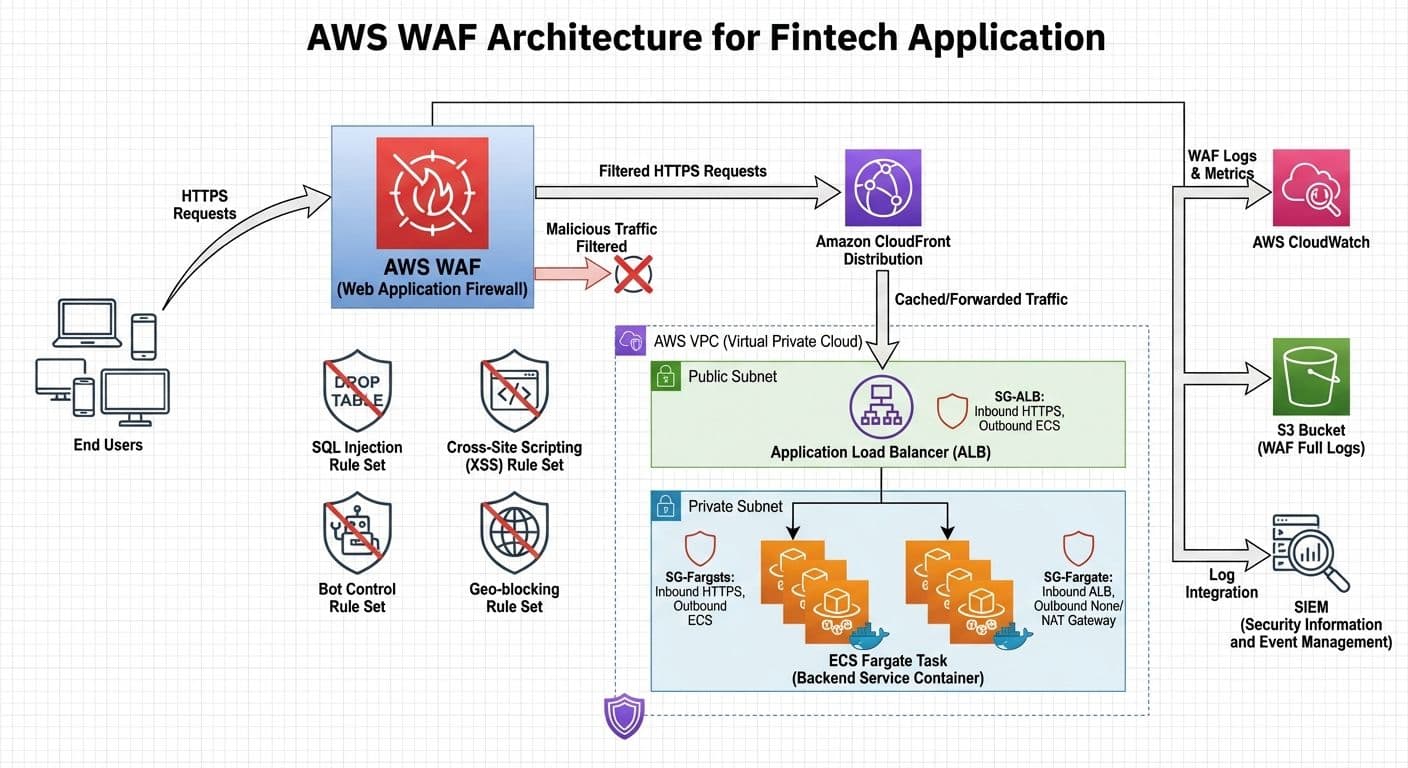
The most effective pattern attaches AWS WAF to a CloudFront distribution in front of your Application Load Balancer and ECS Fargate services.
Traffic flow: Internet → CloudFront → WAF WebACL → ALB → ECS Fargate
Why WAF on CloudFront instead of ALB:
A focused set of managed rule groups provides strong coverage with minimal false positives:
Avoid enabling every available rule group. Each extra rule adds latency and increases the chance of false positives.
Effective WAF deployment requires proper observability. Key CloudWatch metrics to monitor:
Integrate WAF logs with your SIEM for correlation with other security events.
After implementing this architecture for a fintech payment processing client:
AWS WAF is not a set-and-forget solution. Regular review and tuning based on your application's traffic patterns will maximize protection while minimizing false positives. Start with the recommended managed rule stack, deploy in Count mode first, and iterate based on observed patterns.
How we implemented centralized logging for four ECS Fargate microservices using Grafana Loki and Fluent Bit sidecars, cutting debugging time by 90% and reducing logging costs by 60%.
Read articleHow we used AWS Cloud Map to solve service discovery, health-aware routing, and configuration drift in a 7-microservice transport management system running on ECS.
Read articleLearn how to orchestrate a multi-service blockchain validator stack using Docker Compose, including Sisu, Dheart, Deyes, Ganache, and MySQL, with health checks, logging, and multi-validator setups.
Read article