High availability isn't optional for production workloads. When we built infrastructure for a CRM platform handling enterprise customers, multi-AZ deployment was a non-negotiable requirement. Here's what we learned about building resilient ECS Fargate architectures.
AWS availability zones are physically separate data centers within a region. When you deploy to a single AZ, you're one power outage, network issue, or hardware failure away from complete downtime.
The math is simple: A single AZ typically offers 99.9% availability. Two AZs configured correctly can achieve 99.99% or higher. For a business application, that's the difference between 8+ hours of downtime per year versus less than an hour.
Multi-AZ deployments provide:
- Fault tolerance – Survive AZ failures without complete service outage
- Lower latency – Users connect to the nearest healthy AZ
- Load distribution – Balance traffic across zones for better performance
- Compliance – Many regulations require geographic or AZ-level redundancy
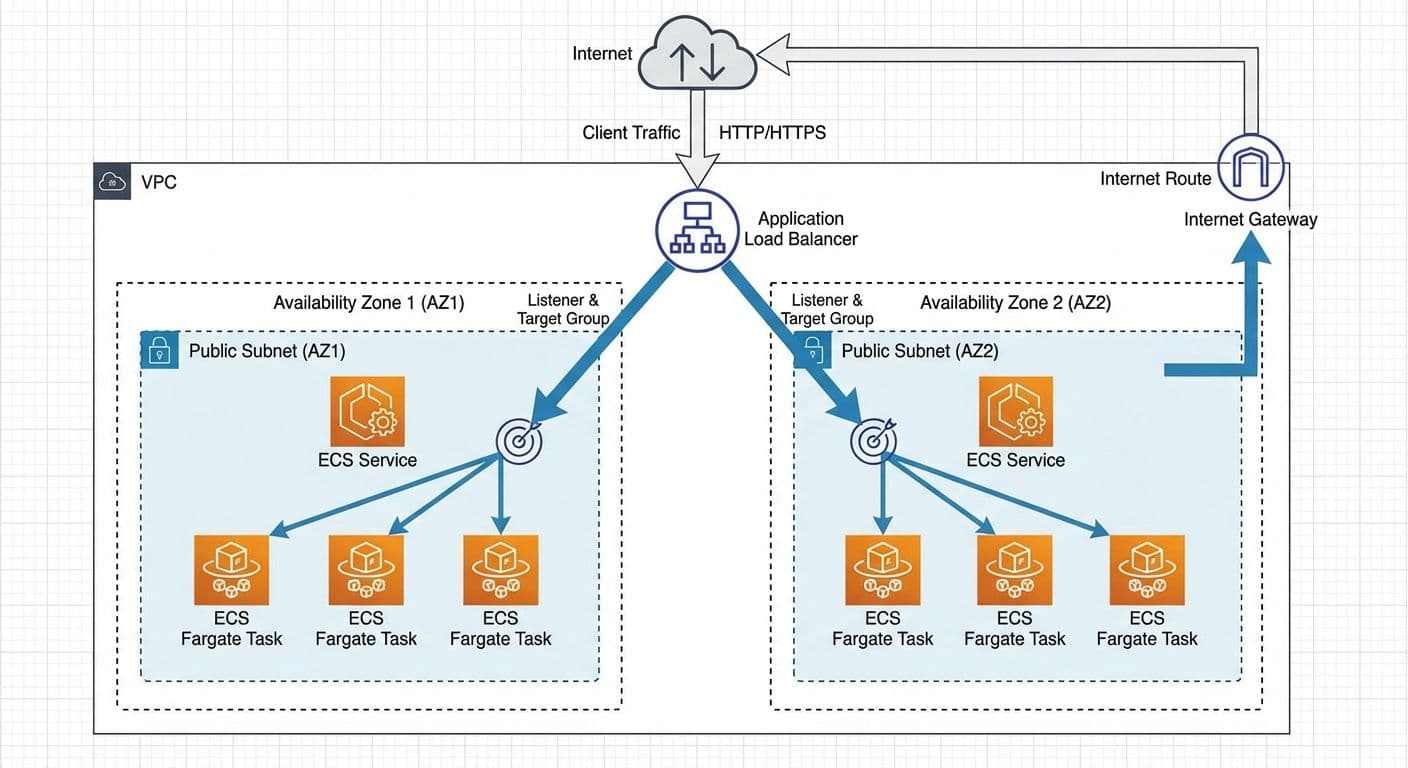
The architecture follows a proven pattern: an Application Load Balancer sits in front of ECS Fargate tasks distributed across two availability zones. Each AZ contains its own public subnet with ECS tasks running independently.
Key components:
- Single VPC spanning multiple availability zones (us-east-2a and us-east-2c in our case)
- Public subnets in each AZ (10.5.1.0/24 and 10.5.2.0/24)
- Application Load Balancer deployed across both subnets
- ECS Fargate cluster with tasks automatically placed in multiple AZs
- Security groups implementing least-privilege access
- Health checks ensuring traffic routes only to healthy tasks
Your VPC forms the foundation of the entire architecture. Get this right and everything else becomes easier.
CIDR block sizing matters. We used a /16 block (10.5.0.0/16) which gives us 65,536 IP addresses. This provides plenty of room for growth without requiring painful re-architecting later. Each subnet uses a /24 block (256 addresses), leaving space for additional subnets as needs evolve.
Enable DNS support. Both EnableDnsHostnames and EnableDnsSupport should be true. This allows your containers to resolve internal AWS service endpoints and communicate with other resources by hostname.
Plan for private subnets. While our example uses public subnets for simplicity, production workloads often benefit from private subnets with NAT gateways. This adds cost but improves security by keeping containers off the public internet.
The Application Load Balancer is the traffic distribution brain of your architecture.
Cross-zone load balancing is enabled by default on ALBs, meaning traffic is distributed evenly across all healthy targets regardless of which AZ they're in. This prevents hot spots when one AZ has more capacity than another.
Health check configuration determines how quickly unhealthy targets are removed from rotation. We use:
- Path: /health (a lightweight endpoint that checks database connectivity)
- Interval: 30 seconds
- Healthy threshold: 2 consecutive successes
- Unhealthy threshold: 3 consecutive failures
SSL termination happens at the ALB. This offloads TLS processing from your containers and simplifies certificate management through AWS Certificate Manager.
Sticky sessions should be avoided unless absolutely necessary. They can cause uneven load distribution and complicate scaling. If you need session persistence, consider external session storage like ElastiCache.
The ECS service definition controls how your containers are deployed and scaled.
Desired count should be at least 2 for multi-AZ redundancy. We typically start with 2 and let auto-scaling handle increases based on load.
Deployment configuration uses these settings:
- Minimum healthy percent: 100% (ensures full capacity during deployments)
- Maximum percent: 200% (allows double capacity during rolling updates)
This means during a deployment, ECS spins up new tasks before terminating old ones, maintaining service availability throughout the process.
Task placement happens automatically when you specify multiple subnets in your service's network configuration. ECS spreads tasks across AZs to maximize availability.
Platform version should be explicitly set to LATEST or a specific version. AWS occasionally introduces new platform versions with security patches and feature improvements.
Security groups are your primary network access control mechanism. We use a layered approach:
ALB Security Group:
- Inbound: Allow 80/443 from 0.0.0.0/0 (or specific IP ranges)
- Outbound: Allow all traffic to VPC CIDR
ECS Task Security Group:
- Inbound: Allow container port (e.g., 8080) only from ALB security group
- Outbound: Allow 443 to 0.0.0.0/0 (for AWS API calls, ECR pulls)
- Outbound: Allow database port to database security group
Database Security Group:
- Inbound: Allow database port only from ECS task security group
- Outbound: None required
This chain ensures traffic can only flow through the intended path: Internet → ALB → ECS Tasks → Database.
Proper health checks are critical for multi-AZ resilience. You need both ALB target group health checks and ECS container health checks.
ALB health checks determine which tasks receive traffic. A failing health check removes the task from the target group within seconds. Design your health endpoint to:
- Return quickly (under 5 seconds)
- Check critical dependencies (database, cache)
- Return appropriate HTTP status codes (200 for healthy, 503 for unhealthy)
Container health checks are defined in your task definition. They help ECS detect containers that are running but not functioning correctly. A failing container health check triggers ECS to stop and replace the task.
Grace period gives new containers time to start up before health checks begin. Set this longer than your container's startup time to prevent premature failures.
Rolling deployments work well for most use cases. ECS gradually replaces old tasks with new ones while maintaining service availability.
For higher-risk deployments, consider blue-green deployments with AWS CodeDeploy:
- Deploy new version to a separate target group
- Run smoke tests against the new deployment
- Switch traffic instantly when ready
- Roll back in seconds if issues arise
Circuit breaker configuration (available since late 2020) automatically rolls back deployments that fail to stabilize. Enable this to prevent bad deployments from taking down your entire service.
Deployment alarms can trigger rollbacks based on CloudWatch metrics. If error rates spike or latency increases beyond thresholds, CodeDeploy automatically reverts to the previous version.
Visibility into your multi-AZ deployment is essential.
CloudWatch Container Insights provides detailed metrics for ECS:
- CPU and memory utilization per task and service
- Network traffic patterns
- Storage metrics for tasks with EBS volumes
Key metrics to alert on:
- CPUUtilization > 80% (scaling trigger)
- MemoryUtilization > 80% (right-sizing indicator)
- HealthyHostCount < desired count (availability issue)
- HTTPCodeTarget5XX_Count > threshold (application errors)
- TargetResponseTime > threshold (latency degradation)
Distributed tracing with AWS X-Ray helps debug issues that span multiple services. Enable the X-Ray daemon sidecar in your task definition for automatic trace collection.
Multi-AZ deployments cost more than single-AZ, but usually not double.
What scales with AZs:
- NAT Gateway charges (if using private subnets)
- Data transfer between AZs (typically minimal for well-designed services)
What doesn't scale:
- ALB costs (same regardless of AZ count)
- ECS/Fargate costs (based on task count, not placement)
- ECR costs (images pulled once per task, cached locally)
Cost optimization tips:
- Use Fargate Spot for fault-tolerant workloads (up to 70% savings)
- Right-size your task definitions based on actual usage
- Enable auto-scaling to avoid over-provisioning
- Consider Compute Savings Plans for predictable workloads
Building a multi-AZ ECS Fargate architecture requires coordinating VPC design, load balancing, service configuration, and security. The investment pays off with significantly improved availability and resilience.
| Component | Recommendation |
|---|
| Availability Zones | Minimum 2, consider 3 for critical workloads |
| Task Count | At least 2 for redundancy |
| Health Checks | Both ALB and container level |
| Deployments | Rolling with circuit breaker enabled |
| Security Groups | Layered, least-privilege approach |
| Monitoring | Container Insights + custom alarms |
Start with at least two AZs, implement proper health checks at multiple levels, and use rolling deployments with circuit breakers for zero-downtime updates. The patterns described here have served us well across dozens of production deployments.